
16 reasons to choose Shopify for ecommerce
August 8, 2024
· Emmie Sjölander Holmgren

Choosing an ecommerce platform affects more than the storefront. Your team will use it to manage products, promotions, orders, content, reporting, and connections to other systems.
Shopify packages many of those functions into a hosted platform. That can shorten implementation work and reduce technical maintenance, although the final cost and complexity depend on your theme, apps, integrations, and markets.
These are 16 practical reasons to consider Shopify.
1. The admin is easy to learn
Shopify gives merchants one admin area for products, orders, customers, discounts, content, and store settings. Staff can handle common tasks without working directly in code.
Teams still need clear processes for product data, permissions, returns, and publishing. A simple interface does not fix inconsistent operations, but it can make those processes easier to run.
2. A standard store can launch quickly
A straightforward Shopify store can be configured without building the commerce engine from scratch. Products, payments, shipping rules, policies, and a theme can all be set up within the platform.
Migration timelines vary. Large catalogs, custom checkout requirements, ERP connections, redirects, and international setups add work. Ondigital previously helped Collar of Sweden move platforms in two weeks; read the Shopify launch case study.
3. Shopify is cloud-based
Authorized users can manage the store through a browser from any location with internet access. Shopify operates the underlying hosting infrastructure, so the merchant does not need to maintain its own ecommerce servers.
Access should still be controlled. Use individual staff accounts, appropriate permissions, and multi-factor authentication rather than sharing administrator credentials.
4. Common tasks require no coding
Merchants can add products, process orders, publish pages, create discounts, and update navigation without writing code.
Development may still be required for custom theme components, unusual product logic, advanced integrations, or extensive changes to the buying experience. Shopify reduces the coding required for routine work; it does not remove every technical dependency.
5. The theme editor supports visual page building
Compatible Shopify themes use sections and blocks that teams can add, remove, and reorder in the theme editor. This makes campaign pages and homepage updates faster than asking a developer to edit templates for every change.
The available controls depend on the selected theme. Check whether it supports the page layouts, product information, and merchandising components your team needs before committing to it.
Test the editing workflow
Ask the people who will run the store to build a product page, update the homepage, and schedule a promotion in a development store. Their experience will reveal more than a theme demo.
6. Initial infrastructure costs can be lower
Shopify removes the need to procure hosting and build core commerce functions separately. This can keep the initial technical scope manageable for a new store or a business moving from a self-hosted platform.
Budget for the complete setup rather than the subscription alone. Theme work, paid apps, data migration, payment fees, integrations, and ongoing development can materially change the total cost.
7. Plans support different operating needs
Shopify offers multiple subscription plans, allowing a business to choose based on its current requirements and change plans later.
Plan names, prices, transaction fees, and included features can change. Review Shopify’s current terms for your country and compare them against expected order volume, staff access, reporting needs, and checkout requirements.
8. There is a broad selection of themes
The Shopify Theme Store includes themes designed for different catalog sizes, industries, and merchandising styles. Themes can provide a useful starting point for product pages, collection pages, search, navigation, and editorial content.
A theme should be assessed for function before appearance. Review filtering, variant handling, media support, accessibility, performance, and how easily your team can edit it.
9. Current themes are built for mobile shopping
Themes available through Shopify’s official theme store are designed to adapt across screen sizes. This gives teams a responsive foundation for mobile, tablet, and desktop traffic.
Responsive design is only the starting point. Large images, third-party scripts, intrusive pop-ups, and crowded navigation can still produce a poor mobile experience. Test key journeys on real devices, including search, product selection, cart, and checkout.
10. Analytics are included
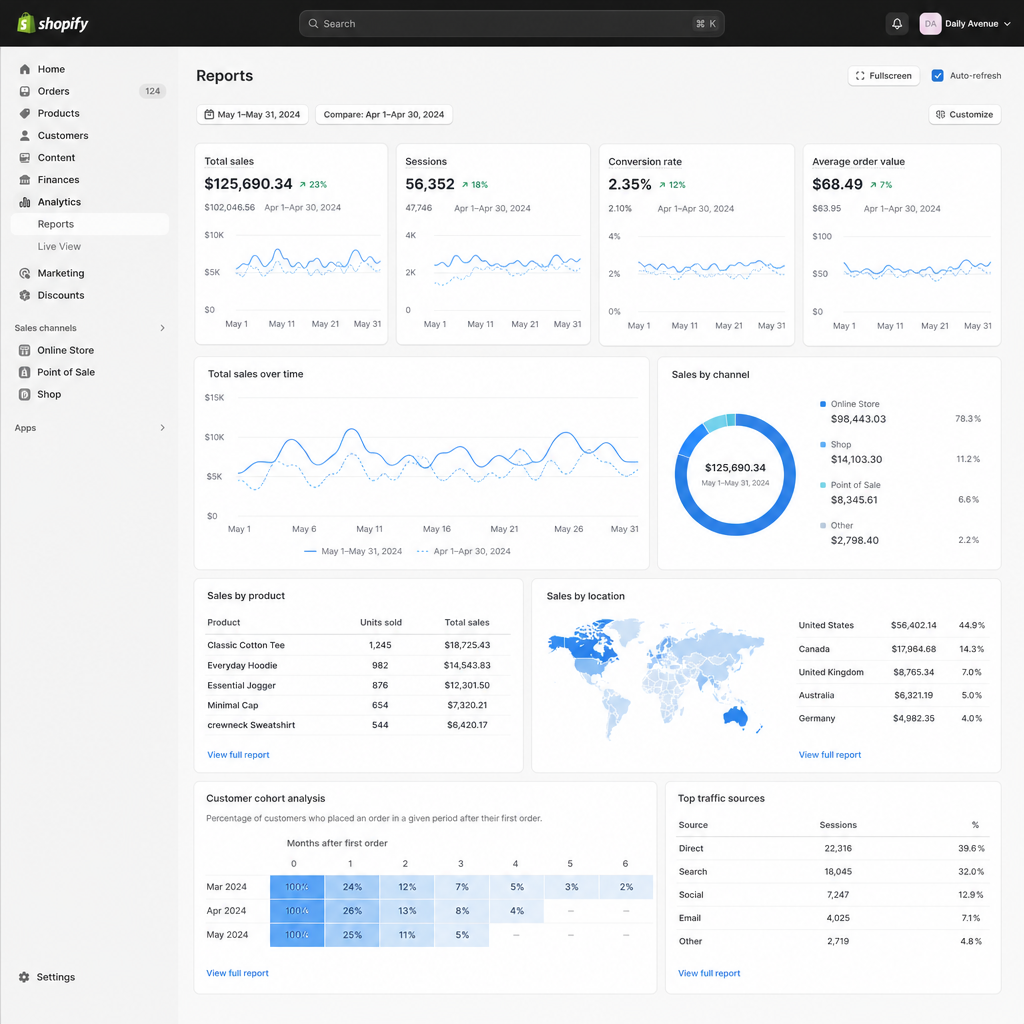
Shopify provides reporting on areas such as sales, orders, products, customers, and acquisition. The reports available can depend on the selected plan.
Built-in reporting is useful for daily store management, but many teams also need advertising, finance, inventory, and ERP data in the same view. Define metrics consistently before combining sources. For example, Shopify sales, accounting revenue, and ad-platform conversion value may follow different rules.
11. Hosting and platform maintenance are managed
Shopify manages hosting, platform updates, and much of the underlying security work. This differs from a self-hosted setup such as WooCommerce, where the merchant or its agency usually manages hosting, software updates, and compatibility issues.
Merchants remain responsible for account security, app selection, privacy configuration, data handling, and their own custom code.
12. Apps extend the store
The Shopify App Store includes tools for functions such as reviews, subscriptions, customer service, marketing, search, and inventory workflows. Apps can fill a requirement without building a custom feature.
Each app also adds cost and another dependency. Before installing one, check:
- Whether Shopify already provides the required function
- What store and customer data the app can access
- How it affects storefront performance
- Whether it supports your markets and languages
- What happens to data and functionality if you remove it
13. Shopify supports multichannel and international selling
Shopify can support sales through the online store and other connected channels. Its international commerce features can also help merchants manage multiple markets.
The exact setup depends on available sales channels, business location, payment providers, currencies, taxes, duties, languages, and fulfillment operations. Confirm those requirements market by market rather than assuming one configuration will work everywhere.
14. Discount tools are built in
Teams can create discount codes and automatic discounts without installing a separate promotion engine for common offers. Shopify supports conditions such as qualifying products, customer eligibility, usage limits, and active dates.
Complex promotion stacking or highly specific pricing rules may require apps or custom development. Test discount combinations before launch, especially when several campaigns overlap.
15. Gift cards are supported
Shopify includes gift card functionality, giving customers another payment option and allowing recipients to redeem value later.
Before enabling gift cards, confirm local accounting, expiry, tax, and consumer-law requirements. Finance teams also need a process for tracking outstanding gift card liabilities and redemptions.
16. Shopify provides a solid SEO foundation
Shopify supports editable page titles, meta descriptions, headings, alt text, redirects, and automatically generated sitemaps. Themes also provide the technical structure used to render product, collection, and content pages.
The platform does not guarantee search rankings. Results still depend on useful content, internal linking, page performance, product information, backlinks, and crawl management. Migration work also needs careful URL mapping so valuable pages do not disappear or redirect incorrectly.
Plan redirects before migration
Export existing URLs and map each important page to its closest Shopify replacement. Launching first and fixing broken links later can disrupt customers, campaigns, and organic search traffic.
Is Shopify the right fit?
Shopify is a strong option for teams that want managed infrastructure, accessible store administration, and an established app and partner ecosystem. It can work for a new direct-to-consumer store as well as a larger operation with multiple systems.
Assess the platform against your actual requirements:
Area | Questions to answer |
|---|---|
Catalog | Can Shopify represent your products, variants, bundles, and pricing rules? |
Markets | Which currencies, languages, taxes, duties, and payment methods are required? |
Operations | How will orders, returns, inventory, and fulfillment move between systems? |
Data | Which figures must reach finance, advertising, purchasing, and management dashboards? |
Ownership | What can the internal team manage, and where will development support be needed? |
Cost | What is the full cost of plans, apps, themes, integrations, and maintenance? |
A short discovery phase or development-store prototype can expose gaps before migration work begins.
Planning a Shopify store or migration?
We can help you define the technical scope, choose an implementation approach, connect operational data, and prepare the store for launch.